


CardSnacks: ecards, gift cards
4.87.50K Reviews
App Specs
- Version
- 20260824
- Updated On
- License
- Free
- Downloads
- 100,000+
- Developer
- Mobigram LLC
- Categories
- Lifestyle
- Platform
- Android
Screenshots
 Analysis by AppCompare
I like the idea of a greeting that feels more considered than a quick text but takes less planning than finding and mailing a paper card. That is the space CardSnacks aims to fill: it lets me put a personal message into a digital card and send it by text or email, with the option of pairing the greeting with a gift card. It suits the small moments when I want to acknowledge someone without turning the gesture into a project.
Where the app fits in everyday life
I’d reach for it when a friend’s birthday appears on my calendar while I’m between errands, or when I want to send a thank-you that feels warmer than a one-line message. A useful approach is to choose the occasion first, then make the wording specific: mention the shared joke, the favor you appreciated, or the detail that makes the card clearly meant for that person. Personal wording does more work than elaborate decoration.
It can also help with occasions that are easy to overlook: a quick congratulations, a note to check in, or a greeting sent to someone who lives far away. Since the card goes through familiar channels such as text and email, the recipient can receive it without needing to adopt the same app. I’d still consider whether a digital greeting suits the person. Someone who treasures handwritten mail may appreciate a physical card more, even if it takes longer to arrive.
Choosing a card without overworking it
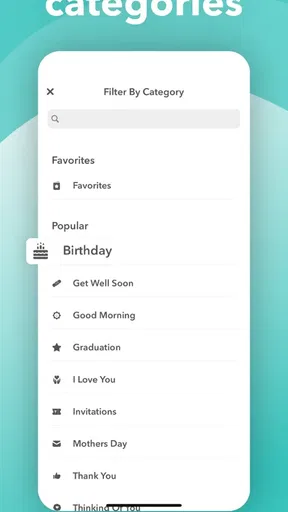
Templates are helpful when I know the sentiment but don’t want to design a layout from nothing. I’d treat them as a starting point rather than a finished message: pick a style that matches the recipient, then add a concise note that sounds like me. A card for a close friend can be playful; a thank-you to a colleague may call for something simpler. Matching the tone matters more than filling every available space.
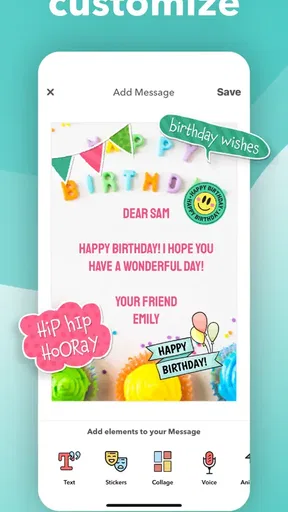
The option to add personal touches can make a card feel less like a generic greeting, but it also creates a small trade-off. Photos, music, or a voice message can add intimacy when they have a clear reason to be there; piling them all on can distract from the note. I’d preview the result before sending and ask whether each extra makes the message more meaningful. For a quick greeting, a clean design and a few sincere lines may be the better choice.
Gift cards and the value of a personal note
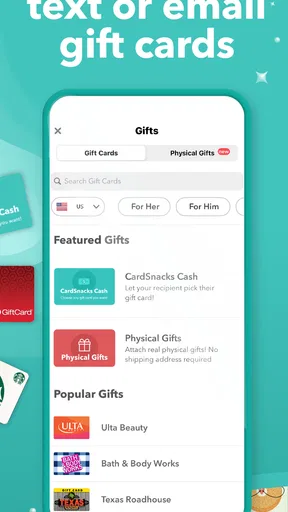
Pairing a greeting with a gift card can be practical when I want to give someone a choice rather than guess at a specific present. It may work especially well for a last-minute birthday or a thank-you when I know the recipient would welcome a particular kind of treat. The card still needs a human touch: a short explanation of why I chose it makes the gift feel intentional instead of like a substitute for a conversation.
I would check the gift-card selection and the final cost in the app before committing. CardSnacks is free to download, but it offers in-app purchases, so the price of any paid item matters if I’m trying to keep the gesture within a budget. If all I need is a greeting, I’d stick to the free options rather than assume that every design or gift choice costs nothing. For a present with a firm budget, comparing the available choices first avoids an awkward surprise at checkout.
Worth Reading Before You Choose

Flipboard Shows What News Apps Must Do Beyond the Feed

Switching to Android Auto Means Rethinking Your Driving Routine

Google Calendar Makes a Crowded Week Easier to Manage

Ludo King Makes the Most of the Minutes Between Plans

Baby Panda World Brings Quick Play to Modern Phones, but Its Game Library Feels Busy

ESPN’s Live Game View Makes Following Close Games Easier
How it compares with other ways to send a greeting
A standard text is quicker and better for an everyday exchange, but it can disappear into a busy conversation. CardSnacks gives the message a more deliberate presentation. A paper card has a physical keepsake quality that a digital one cannot reproduce, while a separate gift-card purchase may be preferable if I want to choose the retailer or delivery method independently. The app’s appeal is the combination: a designed greeting and, where appropriate, a gift in one sending flow.
That combination is not automatically right for every recipient. If someone avoids digital gifts, prefers a handwritten note, or needs a particular product that is not among the choices available, I’d use another route. Likewise, if I only need to send a simple “thanks,” a direct message is less effort. CardSnacks makes the most sense when the presentation itself is part of what I want to give.
What the current version tells me—and what it doesn’t
CardSnacks is a lifestyle app from Mobigram LLC. It was released on February 13, 2020, and its current version is 20260224. That version number gives me a concrete marker for the app’s present software state, but it is not a changelog: I can’t infer from the number alone which features changed or how a specific update affected the design. I’d check the version shown on my device before following any older instructions, since screens and flows can change as an app evolves.
The app has a 4.8 average from around 15,000 ratings, and it has been installed over 100,000 times. Those figures suggest that many people have tried it and that ratings are broadly favorable, but they don’t tell me whether its style will suit my friends or whether a particular gift option is right for me. It is free to download, rated Teen, and requires Android 10 or later; in-app purchases range from $2.99 to $29.99 per item. I’d keep that distinction in mind: trying the app and buying an optional item are separate decisions.
Who will get the most from it
I think it is best for people who often remember occasions at short notice, enjoy adding a personal touch, and want to send a greeting without asking the recipient to install anything. It may also suit someone who likes pairing a message with a gift but prefers not to shop for a separate physical card. If you mainly want a blank canvas for graphic design, a mailing service, or a low-cost way to send plain messages, this is probably not the tool I’d choose first.
Before sending, I’d check the recipient’s contact details, read the message once as if I were receiving it, and make sure any photo or voice recording is something I’m comfortable sharing through the chosen channel. That small pause is useful for any digital greeting, especially when a personal note or gift is involved. It helps keep a thoughtful gesture from becoming an accidental send or an overly elaborate one.
In the world of digital communication, finding a unique way to express our feelings can sometimes feel like searching for a needle in a haystack. Enter CardSnacks, an app that’s all about adding a little zest to your e-cards and gifts. I’ve been playing around with it, and I’m here to spill all the beans about what makes it tick.
What is CardSnacks All About?
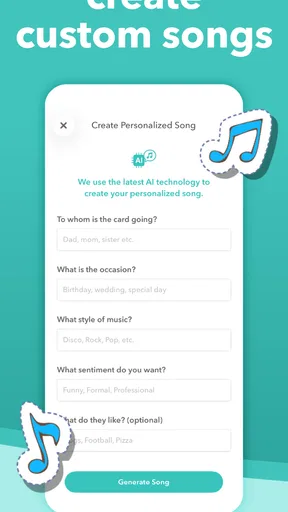
Imagine being able to send a card that’s not just a piece of digital paper but a whole experience. That’s exactly what CardSnacks offers. It’s not just about sending digital cards; it’s about creating personalized, animated ecards that can include music, photos, and even gift cards. Whether it’s a birthday, anniversary, or just a "thinking of you" moment, this app has got you covered.
Easy Peasy User Experience
If you’re like me, you probably value an app that’s straightforward. CardSnacks does a great job of keeping it simple. The interface is user-friendly, with everything you need right at your fingertips. The process of creating a card is straightforward, making it perfect for those who want to whip up something special without a lot of fuss.
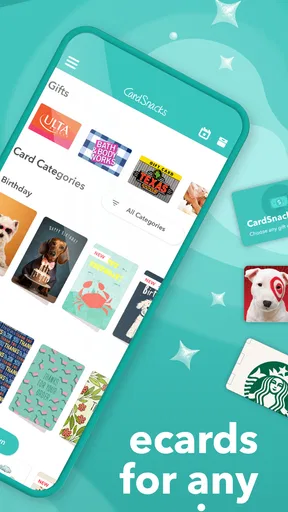
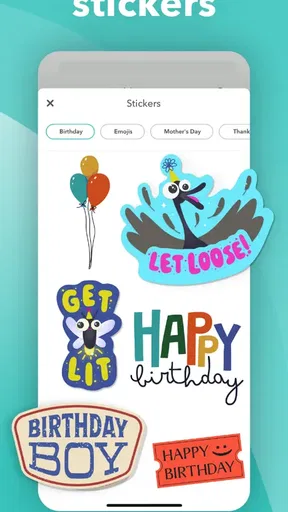
Once you’ve downloaded the app, you’re greeted with a clean dashboard. From here, you can start creating by choosing from a wide variety of templates or starting from scratch. Trust me, even if you’re not the creative type, the templates make you look like a pro.
A World of Customization
One of the standout features of CardSnacks is the level of customization it offers. You can add personal touches like photos, music, and even your own voice messages. The app boasts an impressive music library, so whether you’re into pop, classical, or something in between, you’ll find the perfect track to set the mood.
And if you’re worried about variety, fear not. The app is constantly updated with new templates and styles, ensuring that your cards never feel stale. Plus, let’s not forget the gift cards. You can add gift cards from popular brands, making your e-card not just a message but a real gift.
Sharing the Love
Once your masterpiece is ready, sending it is a breeze. You can share your card via text, email, or even social media. This flexibility is fantastic, especially if you want to connect with someone across different platforms. And the best part? Your recipient doesn’t need to have the app to view your card. How cool is that?
Why Choose CardSnacks?
In a sea of social media messages and memes, CardSnacks stands out as a unique way to express your thoughts. It’s not just about sending a message; it’s about making someone’s day a little brighter. The combination of ease of use, customization, and the ability to add real gifts makes this app a winner in my book.
While no app is perfect, CardSnacks comes pretty close for anyone looking to add a personal touch to their digital communications. It’s like having a little slice of creativity in your pocket, ready to be unleashed whenever the occasion calls for it.
Final Thoughts
All in all, if you’re on the hunt for a way to spice up your greetings, give CardSnacks a whirl. It’s fun, versatile, and adds a little bit of magic to the otherwise mundane act of sending a card. So next time you’re looking to make someone smile, remember that with CardSnacks, you’ve got more than just cards—you’ve got a whole world of possibilities.
Pros
- Wide variety of e-card templates
- Easy integration with gift cards
- User-friendly interface
- Personalization options available
- Quick delivery to recipients
Cons
- Limited customization for templates
- Requires account for full features
- Occasional app crashes
- In-app purchases can be pricey
- Limited offline functionality
FAQs for CardSnacks: ecards, gift cards
What is CardSnacks and how does it work?
CardSnacks is an app that allows users to create and send personalized e-cards and gift cards directly from their smartphones. Users can choose from a wide range of templates, add personalized messages, and include digital gift cards from popular retailers. The app is designed to make sending thoughtful gifts quick and easy, perfect for any occasion.
Is CardSnacks free to use?
CardSnacks is free to download and offers a variety of free e-card designs. However, some premium features and gift card options may require in-app purchases. Users can enjoy creating basic e-cards without any cost, but should be aware of potential charges for additional features and gifts.
Can I send gift cards internationally using CardSnacks?
Yes, CardSnacks allows users to send gift cards internationally. The app supports a wide range of retailers across different countries, making it convenient to send gifts to friends and family around the world. However, availability may vary depending on the recipient's location and the retailer's policies.
How secure is the payment process for purchasing gift cards?
CardSnacks employs secure payment processing for all transactions. Users can rest assured that their financial information is protected through encryption and secure connections. The app partners with reputable payment providers to ensure that all purchases are safe and reliable.
Can I customize the e-cards with my own content?
Absolutely! CardSnacks offers extensive customization options. Users can personalize e-cards by adding their own text, photos, and even audio messages. The app provides a user-friendly interface to make customization easy, allowing for truly personalized greetings tailored to the recipient's preferences.


